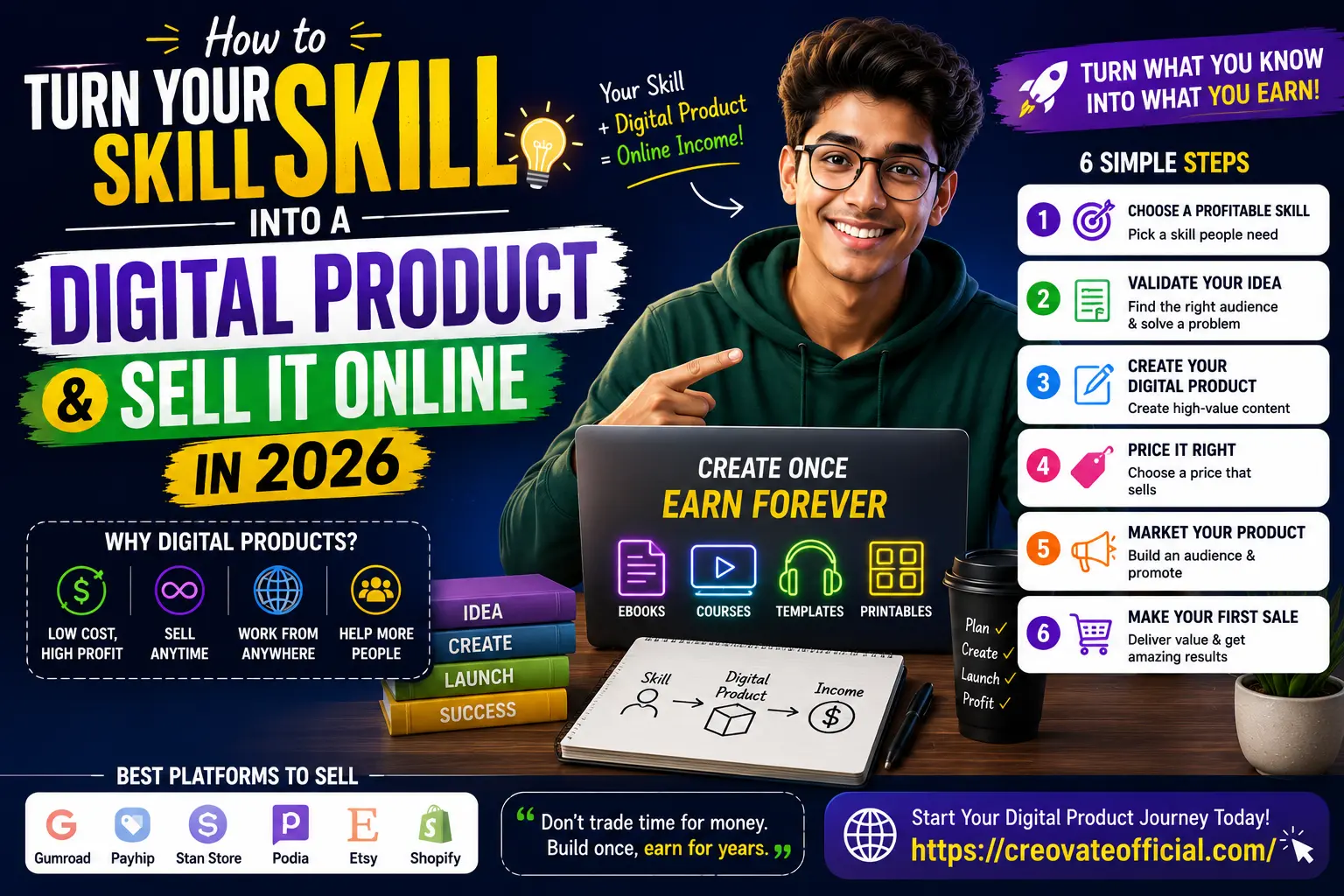
Quick answer: To turn your skill into a digital product, pick one problem you can already solve for someone, package the solution into a downloadable format (ebook, template, printable, or short course), price it based on the outcome it delivers rather than the hours it took you, and list it on a beginner-friendly platform like Gumroad, Payhip, or Etsy. Your first sale usually comes from an existing audience — a community, a social following, or people searching for the exact problem you solved — not from a perfect product.
🎁 Free Online Income Starter Kit (2026)
A short worksheet to help you shortlist your best product idea, sketch your offer, and map your first 30 days. Drop your email and it's yours — plus occasional tips from Creovate Official.
No spam. Unsubscribe anytime.
Why Trust This Guide
This guide is written and maintained by the Creovate Official team, led by a founder with an MBA in Marketing and hands-on experience building and selling digital products, including our own Monthly Budget Planner. We've tested most of the tools and platforms mentioned here in our own workflow before recommending them, and we update this article as pricing, features, and platform policies change.
Some links in this article are affiliate links, which means we may earn a small commission if you sign up or make a purchase, at no extra cost to you. We only recommend tools we've genuinely used or researched in depth, and we call out real drawbacks, not just strengths. Nothing here is financial advice — income from digital products depends on effort, niche, and execution, and is never guaranteed.
Table of Contents
- 1. What Counts as a "Digital Product"?
- 2. Choose a Skill Worth Packaging
- 3. Validate Your Idea Before You Build
- 4. Pick the Right Product Format
- 5. Create Your Product (Tools That Help)
- 6. Price It Right
- 7. Choose a Platform to Sell On
- 8. Recommended Tools, Reviewed
- 9. Market Your Product
- 10. Pros & Cons of Selling Digital Products
- 11. Decision Guide: What Should You Actually Choose?
- 12. Frequently Asked Questions
- 13. Final Verdict
- 14. Related Resources
What Counts as a "Digital Product"?
A digital product is anything you create once and sell repeatedly without shipping a physical item or trading more hours for more money. That's the entire appeal: you build it during evenings and weekends, and it can keep generating income long after you've stopped actively working on it.
In 2026, the most common digital products creators sell fall into a handful of buckets:
- Ebooks and guides — a written walkthrough of how you do something, from meal planning to freelance pricing.
- Templates — spreadsheets, Notion boards, resume layouts, social media calendars, or planners like our own Monthly Budget Planner.
- Printables — checklists, trackers, and worksheets people print or fill in digitally.
- Online courses — video or text lessons that teach a process step-by-step.
- Digital tools — calculators, prompt packs, plugins, or lightweight software.
- Memberships and communities — ongoing access to resources, coaching, or a group.
The common thread isn't the format — it's that you've compressed real experience into something someone else can use in a fraction of the time it took you to learn it. That compression is the actual product.
Choose a Skill Worth Packaging
You don't need to be the world's leading expert. You need to be reliably ahead of the person you're helping, and able to explain the "how" clearly. Start by listing three columns: what people already ask you for help with, what you can do faster than most people, and what you'd enjoy explaining a hundred times over. Your best first product usually sits where two or more of those columns overlap.
Questions to narrow it down
- What's a problem you've solved for yourself that others still struggle with?
- What do coworkers, friends, or forum members message you to ask about?
- Is there a paid course or ebook already selling in this space? (Competition is a demand signal, not a red flag.)
- Can you describe the transformation in one sentence — "helps X do Y without Z"?
Common mistake: Choosing a topic that's interesting to you but has no visible buyer behavior — no forum threads, no existing paid products, no search volume. Passion helps you finish the product; demand is what sells it.
Validate Your Idea Before You Build Anything
Validation doesn't require a survey company. It requires evidence that real people will pay for the outcome you're proposing, gathered before you spend weeks building.
- Search the exact problem. Look at what already ranks and sells. If three or more established sellers are covering the topic, there's a market — your job is to angle it differently or serve an underserved sub-audience.
- Ask your existing audience. Post a one-question poll in a relevant Facebook group, subreddit, or your own following: "Would a [format] that helps you [outcome] be useful?" Read the comments, not just the numbers.
- Pre-sell a lightweight version. Offer a waitlist or a $9 early-access price for a stripped-down version before building the full product. Even five pre-orders is stronger validation than 500 "likes."
- Check price anchors. Search for similar products on Gumroad, Etsy, or Payhip to see what people already pay for comparable value.
If validation comes back weak, don't scrap the skill — narrow the audience or reframe the outcome instead of abandoning the idea entirely.
Pick the Right Product Format
The format should match how your audience prefers to consume information and how much time you realistically have to build. Here's how the main formats compare in practice.
| Format | Time to build | Skill needed | Typical price | Best for |
|---|---|---|---|---|
| Printable / checklist | Few hours | Basic design | $3–$15 | Fast first product, visual niches |
| Template (spreadsheet, Notion) | 1–3 days | Tool-specific know-how | $9–$49 | Practical, repeatable problems |
| Ebook / guide | 1–3 weeks | Writing | $9–$39 | Explaining a full process |
| Mini video course | 2–4 weeks | Teaching on camera or screen | $29–$149 | Skills that need demonstration |
| Membership / community | Ongoing | Community management | $9–$49/mo | Recurring, evolving topics |
If this is your first digital product, start with a printable or template. It forces you to solve one narrow problem well, and you can launch it before motivation fades — momentum matters more than scope at this stage.
Create Your Product: Tools That Actually Help
You don't need a production studio. Most successful first products are built with two or three lightweight tools. Here's a realistic stack by task.
Writing and outlining
If your product involves written content — an ebook, email sequence, or course script — an AI writing assistant can help you move from blank page to structured draft much faster, as long as you edit for your own voice and real examples afterward. We use Rytr for first drafts, outlines, and product descriptions.
Video content
If you're building a course or promotional videos, you'll want simple editing and, optionally, AI-generated presenter videos. CapCut handles trimming, captions, and social-ready exports without a learning curve, while Synthesia lets you turn a script into an AI avatar video if you'd rather not appear on camera.
Delivery and site speed
If you're selling from your own WordPress site rather than a marketplace, page speed affects both conversions and SEO. Tools like FastPixel optimize image and page load performance so your checkout page doesn't lose buyers to a slow load.
Customer support at scale
Once you have more than a handful of customers, repeated support questions eat into your time. A trained chatbot such as CustomGPT can answer common product questions from your own documentation, freeing you up to focus on new products.
Best practice: Build the smallest complete version first. A 12-page guide that fully solves one problem outsells a 90-page guide that's half-finished and never launches.
Price It Right
Price based on the outcome your product delivers, not the hours you spent making it. A budgeting template that helps someone save $200 a month is worth far more than the two evenings it took to build.
A simple pricing framework
- Research 5–10 comparable products on the platform you plan to sell on and note the price range.
- Price in the middle of that range for your launch — pricing too low signals low quality, and too high without proof (reviews, testimonials) slows early sales.
- Offer one tier, not five. A single well-priced option converts better than a confusing menu for a brand-new product.
- Add a limited-time launch discount to reward early buyers and generate your first reviews.
- Revisit pricing after 20–30 sales based on your actual conversion rate, not guesswork.
Common mistake: Pricing at $2–$5 "to make it easy to buy." Ultra-low prices attract low-commitment buyers, generate refund requests, and make it harder to raise prices later without alienating existing customers.
Choose a Platform to Sell On
Where you sell matters almost as much as what you sell. Marketplaces bring built-in traffic; your own store gives you full control and higher margins once you have an audience.
| Platform | Setup effort | Built-in traffic | Fees | Best for |
|---|---|---|---|---|
| Gumroad | Very low | Low | 10% + $0.50/sale (free plan; 30% on Discover-sourced sales) | Fastest way to launch a first product |
| Payhip | Low | Low | 5% on free plan; 2% at $29/mo; 0% at $99/mo | Keeping more of your revenue as you scale |
| Etsy | Low | High | $0.20 listing + 6.5% transaction + ~3% processing | Printables, planners, visual products |
| Stan Store | Low | Medium (via your own following) | $29–$99/mo flat, no free plan, 0% transaction fee | Creators selling to an Instagram/TikTok audience |
| Podia | Medium | Low | From ~$42/mo (5% fee); 0% fee from ~$75/mo — no free plan | Courses and memberships together |
| Systeme.io | Medium | Low | Free plan available, 0% transaction fee on all tiers | Full sales funnel + email in one tool |
| Shopify | Higher | Low (you drive traffic) | From $39/mo + ~2.9% processing | A fully branded, scalable store |
For most beginners, the right move is to launch on Gumroad or Etsy first to prove the offer works, then migrate to a self-hosted funnel via Systeme.io once you're ready to build a real brand and keep more of each sale.
Recommended Tools, Reviewed
We've used or closely researched each of these. None is required to launch — pick based on the gap in your current workflow.
Rytr — AI Writing Assistant
ContentRytr helps you draft ebook chapters, sales copy, and email sequences faster by generating a first pass you then edit into your own voice.
Advantages
- Fast first drafts for written products
- Affordable entry-level plan
- Templates for sales pages and emails
Drawbacks
- Needs human editing for accuracy and voice
- Not suited for deep technical writing
Best for: Beginners writing their first ebook or product description. Check current pricing on Rytr →
FastPixel — Site Speed Optimization
PerformanceFastPixel compresses images and speeds up page load times, which matters directly for conversion if you're selling from your own site.
Advantages
- Noticeable load-time improvement
- Set-and-forget after setup
- Helps with Core Web Vitals / SEO
Drawbacks
- Only relevant if you host your own store or blog
- Not needed on marketplaces like Etsy or Gumroad
Best for: Sellers running their own WordPress-powered storefront or blog. See FastPixel plans →
CapCut — Video Editing
VideoCapCut is a free, beginner-friendly editor for product demos, course lessons, and short promo clips for social media.
Advantages
- Free to start
- Auto-captions save editing time
- Exports optimized for TikTok, Reels, YouTube Shorts
Drawbacks
- Advanced effects require the paid tier
- Not built for long-form course production
Best for: Editing promo clips and short course lessons. Download CapCut (free) →
GetResponse — Email Marketing
MarketingGetResponse combines email automation, landing pages, and basic funnels — useful once you're ready to build a list around your product.
Advantages
- Automation sequences for launches
- Built-in landing pages
- Scales with subscriber count
Drawbacks
- More features than a total beginner may need on day one
- Learning curve for full automation setup
Best for: Sellers ready to build a real email list. Explore GetResponse →
Systeme.io — All-in-One Funnel Builder
PlatformSysteme.io combines a storefront, email marketing, and course hosting in one dashboard, with a genuinely usable free plan.
Advantages
- Free plan covers real launches
- Sales funnels without extra tools
- Course hosting built in
Drawbacks
- Less design flexibility than Shopify
- Smaller app ecosystem than larger platforms
Best for: Creators who want one tool instead of five. Start free on Systeme.io →
Synthesia — AI Video Generator
VideoSynthesia turns a written script into a presenter-led video using an AI avatar, useful for course intros or product walkthroughs without filming yourself.
Advantages
- No camera or filming setup needed
- Multiple languages and voices
- Consistent, professional output
Drawbacks
- Paid plans required for real use
- Some viewers can tell it's AI-generated
Best for: Course creators who'd rather not appear on camera. Try Synthesia →
CustomGPT — AI Support Chatbot
SupportCustomGPT builds a chatbot trained on your own product documentation to answer buyer questions automatically once you have real sales volume.
Advantages
- Reduces repetitive support emails
- Trains directly on your content
- Embeds on your own site
Drawbacks
- Overkill before you have consistent sales
- Requires decent source documentation to be accurate
Best for: Sellers with growing support volume. See CustomGPT →
Market Your Product
A great product with zero visibility makes zero sales. Marketing doesn't need to mean ads — most first sales come from three channels.
1. An email list
Your list is the one audience you actually own. Offer a small free resource — like our own starter kit above — to start collecting emails before your product even launches, then nurture with a short automated sequence using a tool like GetResponse. For a deeper walkthrough, see our guide to email marketing for beginners and building an email list from zero.
2. Content and SEO
Write helpful, specific content around the exact problem your product solves — the same way this article is built. Over time, search traffic becomes a consistent, low-cost source of buyers. Our SEO for beginners guide and SEO for affiliate marketing post both apply directly to product pages.
3. Social proof and community
Share your process publicly — building in public builds trust before you ask for a sale. Communities like Reddit, Facebook groups, and niche forums are often more effective for a first launch than paid ads. If you eventually want to scale distribution through others, our guide to top affiliate programs and affiliate marketing basics explains how creators recruit affiliates to promote their own digital products.
2026 update: AI search assistants and answer engines increasingly surface concise, well-structured guides directly in results. Clear headings, direct answers near the top of a section, and genuinely useful specifics (like the tables above) now help both traditional SEO and AI-driven discovery.
Pros & Cons of Selling Digital Products
Pros
- Low startup cost compared to physical products
- Sell the same product unlimited times
- Work from anywhere, on your own schedule
- Scales without hiring or inventory
Cons
- Income is not guaranteed and often slow at first
- Requires ongoing marketing, not just building
- Market saturation in popular niches
- Refunds and support take real time as you grow
Decision Guide: What Should You Actually Choose?
What to look for
- A platform with low or no upfront cost while you're still validating
- Tools that solve a real bottleneck you have today, not ones you might need someday
- A format that matches how your specific audience already consumes content
Budget considerations
If you're starting with under $100, prioritize a free-tier platform (Gumroad, Systeme.io's free plan) and one paid tool at most — usually the one that removes your biggest time bottleneck, whether that's writing, editing, or design.
Who should build a digital product right now
Anyone with a repeatable skill, a few hours a week, and the patience to launch an imperfect first version and improve it with real feedback.
Who should wait
If you don't yet have a specific problem you can describe in one sentence, spend a few weeks talking to your audience or potential customers first — building before that clarity usually means rebuilding later.
Frequently Asked Questions
What is the easiest digital product to sell as a beginner?
Templates and printables are usually the easiest starting point because they take the least time to build, require no filming or teaching on camera, and solve one narrow problem well.
Do I need an audience before I sell a digital product?
No, but it helps. You can validate demand and make your first sales inside existing communities, marketplaces like Etsy or Gumroad, and through SEO content, then build your own list from there.
How much does it cost to create a digital product?
Many creators launch their first product for under $100 using free or low-cost tools for writing, design, and hosting, then reinvest early revenue into better software.
How much money can you actually make selling digital products?
Outcomes vary widely and are not guaranteed. Realistic first-month goals are a handful of sales that validate the idea; income tends to compound over months as your list, reviews, and search rankings grow.
What platform is best for selling digital products in 2026?
Gumroad and Payhip are strong for beginners because of low setup effort, Etsy works well for visual products with built-in shopper traffic, and Systeme.io or Shopify suit sellers who want a fully branded store and sales funnel.
Do I need to be an expert to sell what I know?
No. You only need to be a few steps ahead of the person you're helping and able to explain the process clearly and honestly.
How do I price my first digital product?
Start by researching 5–10 similar products, price in the middle of that range, and adjust after your first 10–20 sales based on conversion rate and customer feedback.
Final Verdict
Turning your skill into a digital product isn't about having a perfect idea or expert-level credentials — it's about noticing a problem you already know how to solve and packaging that solution clearly enough that someone else can use it. Start narrow: pick one skill, one format, one platform. Launch something small this month rather than something perfect next year.
Next steps: shortlist your top skill idea using the free starter kit above, validate it with five real people before you build, and list your first version on Gumroad or Etsy within the next two weeks.