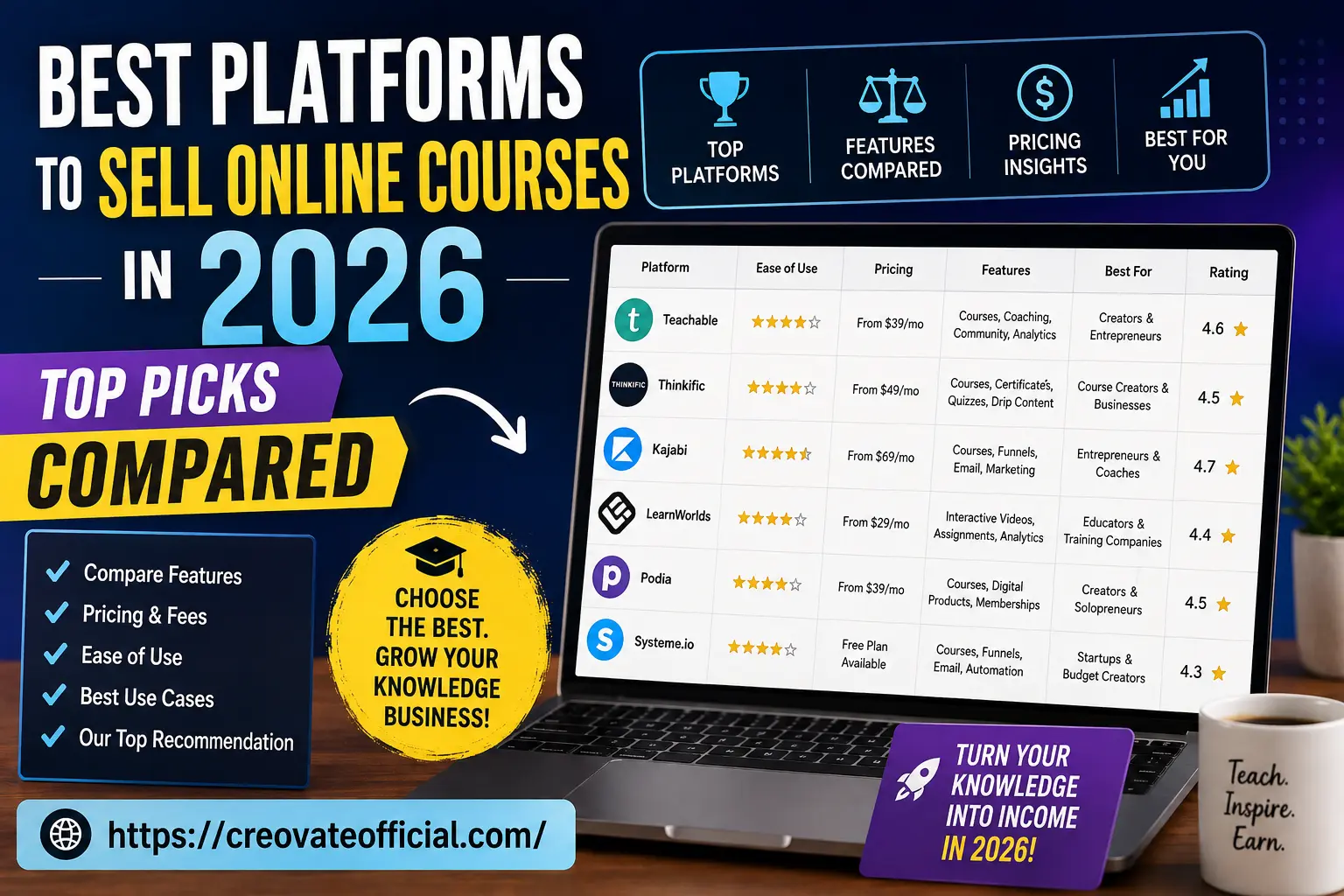
We compared six of the biggest course platforms on pricing, marketing tools, and how fast a beginner can actually launch — so you can pick one without spending a week on tab-hopping and free trials.
If you want one tool to run everything — courses, funnels, and email — Kajabi is the strongest all-in-one platform in 2026, though it's one of the pricier options on this list. If you want something simpler and cheaper to start, Teachable or Thinkific both let you launch a course in an afternoon. On a tight budget, Systeme.io has a genuinely usable free plan. There's no universal "best" — it depends on your budget, your audience size, and how much marketing automation you actually need.
A short, no-fluff PDF covering how to price your first course, what to put in a launch email sequence, and a checklist for choosing a platform. Drop your email and it's yours.
Something went wrong saving your email, but here's your download below — it's yours either way. No spam. One email, then you're on the list for future guides. Unsubscribe anytime.I've spent the last several years building and selling digital products, and I've used some of the platforms in this comparison directly for my own work. Every platform in this guide — including the ones I haven't personally run a course through — was evaluated using each provider's current pricing and feature pages, demo walkthroughs, verified user reviews on sites like Capterra and G2, and conversations with other creators in course-selling communities, not a rewrite of someone else's listicle.
Most first-time creators spend weeks perfecting their course content and about ten minutes picking where to sell it. That's backwards. Your platform decides how you get paid, how you market to students, and how much of your revenue disappears into fees before it hits your bank account.
Switching platforms later is painful. You'll re-upload videos, rebuild your checkout page, and possibly lose students who were used to the old login. Picking well the first time saves you that headache entirely.
Underneath the marketing pages, every course platform is solving the same three problems:
The differences between platforms show up in the extras: email marketing, sales funnels, community features, certificates, and how much they take in fees. That's where your decision actually lives.
Two shifts are worth knowing about heading into 2026. First, most platforms have added AI-assisted course building — auto-generating outlines, quiz questions, and even draft video scripts from an outline you type in. Second, community features (think a mini Discord built into your school) have become standard rather than a premium add-on, since creators kept asking for a way to keep students engaged between lessons.
Here's how the six platforms stack up on the things that actually affect your decision. Pricing shown is the starting monthly tier, checked against each provider's official pricing page and third-party listings as of August 2026 — but course platforms change pricing often, so confirm the current rate on the provider's site before you buy.
| Platform | Starting Price | Best For | Standout Feature | Rating |
|---|---|---|---|---|
| Kajabi | From $89/mo | Entrepreneurs & coaches scaling a full business | Courses + funnels + email in one system | 4.7 ★ |
| Teachable | From $39/mo | Creators who want a fast, simple launch | Clean dashboard, coaching add-ons | 4.6 ★ |
| Thinkific | From $49/mo | Course creators & small businesses | Strong quizzes, certificates, drip content | 4.5 ★ |
| Podia | From $33/mo | Solopreneurs selling courses + digital downloads | Courses, memberships & downloads together | 4.5 ★ |
| LearnWorlds | From $99/mo | Educators & training companies | Interactive video, in-depth analytics | 4.4 ★ |
| Systeme.io | Free plan; paid from $17/mo | Startups & budget-conscious beginners | Free tier includes courses + funnels + email | 4.3 ★ |
Best for: creators who want courses, email marketing, and sales funnels without stitching together separate tools.
Kajabi is built for creators who want to run their entire business from one login. Beyond hosting your course, it includes landing pages, email automation, and a built-in CRM that tracks what each student or lead has done. The trade-off is price — it's one of the pricier platforms on this list, and the learning curve is steeper because there's genuinely more to learn.
Trust note: Kajabi doesn't offer a free plan, but its trial is generous enough to build and test a real course before committing.
Best for: first-time creators who want to publish a course this week, not this quarter.
Teachable strips out the complexity. You upload your content, set a price, connect Stripe, and you're live. It also supports 1:1 coaching offers alongside courses, which is handy if you plan to sell higher-ticket calls later.
Trust note: Good middle ground if Kajabi feels like more than you need right now.
Best for: creators building multi-module courses with quizzes, drip content, and completion certificates.
Thinkific leans into structured learning. Drip-feeding lessons over weeks, gating content behind quiz scores, and issuing certificates are all straightforward here — features that matter if you're running something closer to a formal program than a quick mini-course.
Best for: solopreneurs who sell more than one type of digital product.
Podia lets you bundle a course with downloadable templates, a membership tier, and even a small storefront, all under one storefront link. It's a good fit if courses are only part of what you plan to sell.
Best for: educators and training companies who need detailed reporting on how students actually engage.
LearnWorlds stands out for interactive video — you can drop clickable notes, quizzes, or links directly into a lesson while it plays. Combined with detailed analytics, it's a strong pick for anyone training larger groups, like a company onboarding employees.
Best for: creators starting with zero budget who still want funnels and email built in.
Systeme.io's free plan is unusually generous for a tool in this category — it includes course hosting, a basic funnel builder, and email automation, capped at a reasonable number of contacts and students. It's rough around the design edges compared to Kajabi, but it removes the "I can't afford to start" excuse entirely.
You can start with Systeme.io's free plan here if budget is your main constraint right now.
Best value if you'd otherwise pay for four separate tools. Not worth it if you only need basic hosting.
Fastest path from idea to launched course. Marketing tools are lighter than the all-in-one options.
Best for structured, certificate-based programs. You'll need an outside tool for email marketing.
Great if courses are one of several products you sell. Fewer assessment tools than Thinkific.
Best analytics and interactive video. Takes longer to learn than Teachable or Podia.
Unbeatable for starting free. Design and course tools are more basic than the paid-first platforms.
If you're pre-revenue, starting on a free or low-cost plan (Systeme.io, or a Teachable/Podia trial) makes more sense than committing to Kajabi before you know your course will sell. You can always migrate once you have paying students and real data.
Before picking a platform, write down your first course's actual content: how many videos, how many downloads, do you need quizzes, do you need a community. Matching the platform to that list — instead of the flashiest homepage — is what actually prevents a switch six months in.
Your course platform handles hosting and checkout, but a few extra tools consistently make the difference between a course that sells and one that sits there. Here's what we actually use alongside these platforms:
Whichever platform you pick, an engaged email list is what drives repeat launches. If your course platform's built-in email tools feel limited, GetResponse is worth pairing with Thinkific, Teachable, or Podia for sequences, automation, and webinar-based launches.
Clean, well-edited video is one of the fastest ways to make a course feel professional. CapCut is a free, straightforward option for trimming lessons and adding captions before you upload. If you'd rather skip filming altogether, Synthesia can turn a written script into an AI presenter video, which is handy for fast-moving topics that go out of date quickly.
Course sales pages and email sequences take time to write well. Rytr is a low-cost AI writing assistant that's useful for drafting first passes of sales copy, which you then edit into your own voice.
If you're hosting a landing page outside your course platform, page speed affects both conversions and SEO. FastPixel optimizes images and load times without needing a developer.
Once you have enough students, answering the same onboarding questions gets repetitive. CustomGPT lets you build a support chatbot trained on your own course FAQs and materials, so students get answers without waiting on you.
If editing, thumbnail design, or slide decks aren't your strength, Fiverr is a fast way to hire freelancers for one-off production tasks without a long-term contract.
There's no single winner for everyone. Kajabi is the strongest all-in-one choice if you want courses, funnels, and email marketing under one roof. Teachable and Thinkific are better if you want something simpler and cheaper to start. Systeme.io is the best pick if you're on a tight budget.
Yes. Systeme.io has a free plan that includes course hosting, and platforms like Podia and Thinkific offer free trials so you can build and test a course before paying anything.
Most dedicated course platforms run between $17 and $99+ a month on their entry-level paid tier, depending on features, plus payment processing fees of roughly 2–3% per transaction. Some platforms also take a revenue share on their free or lowest tiers.
No. Every platform in this guide gives you a hosted school with its own checkout page, so you can start selling without building a separate website first.
Teachable and Podia are generally the easiest to set up for a first course, thanks to simple dashboards and short setup checklists. Systeme.io is also beginner-friendly and free to start.
Build an email list before launch, use a lead magnet to capture interest, and follow up with a short automated sequence. Platforms with built-in email tools — or a connected tool like GetResponse — make this much easier than doing it manually.
If you take one thing from this guide: pick based on what your first course actually needs, not the platform with the longest feature list. Kajabi wins on power, Teachable and Thinkific win on speed and structure, Podia wins on flexibility, LearnWorlds wins on analytics, and Systeme.io wins on price.
Whichever you choose, the platform is only half the equation. Pair it with a simple email sequence and one focused traffic source, and you'll learn more from your first 10 real students than from another week of research.
Revisit the comparison table